 Mixer AI




Create an animated short: from character sheet to video
An AI cartoon is made in steps: the style and character as an image, then a character sheet, scene frames and only then video. This keeps the hero identical across scenes and spends video generations on frames you have already approved.
More
Grok Imagine Video suits inexpensive short scenes; Seedance 2.5 suits scenes with dialogue and several shots.
Hand-drawn 2D illustration in a children’s-book style, soft warm palette. A girl in a red sweater with white dots, her hair in a bun, sits on a cushion by a large window with rain outside. She holds a red mug with steam rising from it; with her eyes closed she takes a breath, lifts the mug to her lips and sips, then lowers it and looks toward the black cat. The cat sits next to a laptop and hardly moves. Static camera.
Step by step
Describe the style in one paragraph: medium (3D animation, hand-drawn 2D, clay), line, light, palette, proportions.
Save it and paste it unchanged into every prompt of the project.
Make a character sheet as an image in GPT Image 2 or Nano Banana 2: full body from the front, side and back plus a row of facial expressions.
To turn your own photo into the hero, upload it and ask to redraw it in the chosen style.
Build scene frames as images with the same style block and the sheet as a reference.
An image costs less than a video, so approve composition, light and pose there.
Animate the frames.
Grok Imagine Video for inexpensive short scenes. Seedance 2.5 when the scene needs the hero from the sheet, several shots and dialogue. Label references: “image 1 is the character sheet, image 2 is the first frame”.
Check hands, fingers and expressions across the whole clip.
In Seedance 2.5 tick “Draft” (480p) and take the good one to 1080p with “Complete draft”.
Ready prompts for a cartoon
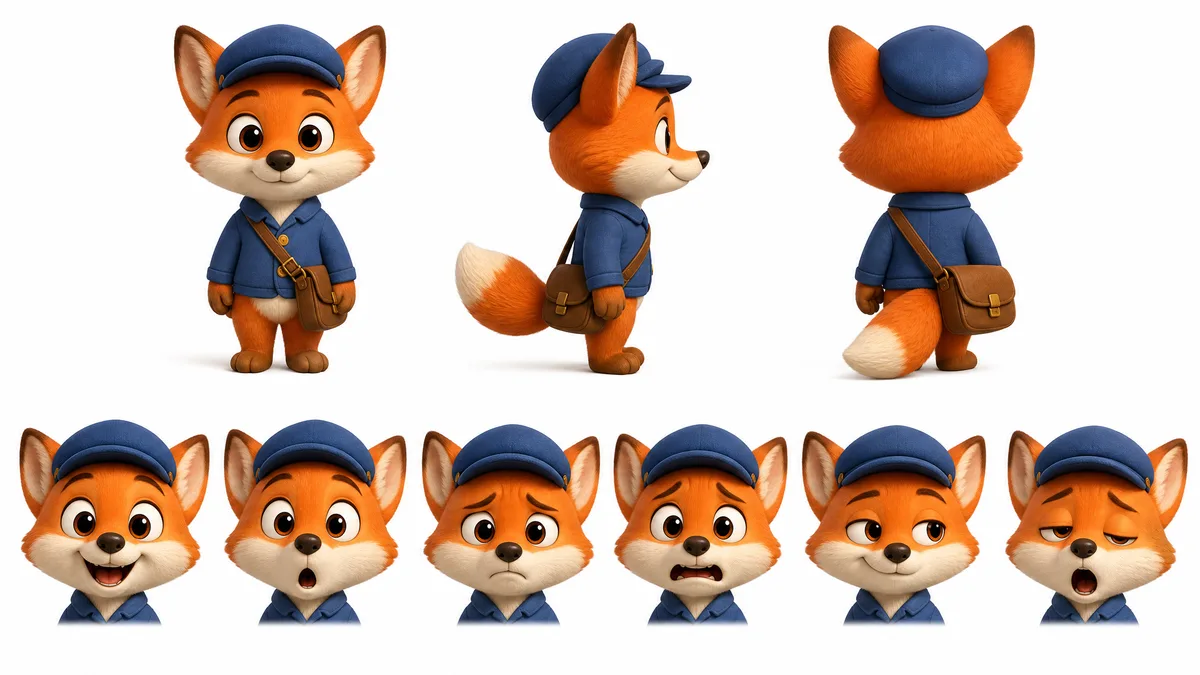
Character sheet on a clean white background, even soft light. Style: 3D animation, soft rounded shapes, large expressive eyes, matte textures, warm palette. The character is a small red fox mail carrier in a blue cap with a brown shoulder bag. Top row: full body from the front, side and back. Bottom row: six close-up facial expressions — joy, surprise, sulking, fright, sly smile, sleepiness. Same proportions, clothes and colors in every view. No text.
Image 1 is the fox character sheet, image 2 is the first frame of the scene. Style: 3D animation, soft light, large eyes, warm autumn palette. 0–3 s: wide shot, the fox runs down a street covered in yellow leaves, the bag bouncing on his shoulder. 3–5 s: medium shot, he stands on tiptoe and drops a letter into a mailbox, ears lifting happily. 5–8 s: close-up, he smiles and says: “Made it!” The camera follows him smoothly. Sound: steps on leaves, rustle of the letter, no music. Exactly one bag, no other characters.
Motion graphics on a dark blue background. Chunky yellow 3D letters of the word “SOON” pop up from below one by one, wobble slightly and settle into a straight line. Small stars flash and fade around them. Static camera. Only this one word, no other text.
Price in coins
How to make a cartoon with AI: the workflow
The order is style → character → character sheet → scene frames → video. Each step builds on the approved one before it, so a wrong look for the hero shows up in a cheap image, not in a finished clip.
Generations share no memory. Attach the same character sheet and the same style block to every new scene, and name references by number and role in the prompt.
One Grok Imagine 1.5 or Seedance 2.5 generation runs up to 30 seconds. A longer cartoon is built from several scenes: the last frame of a finished clip becomes the start frame of the next.
Best AI for animation: which model to choose
Pick the model by what the scene needs. The price of each generation is shown before you run it.
| Task | Model | What to set |
|---|---|---|
| Character sheet and scene frames | GPT Image 2 or Nano Banana 2 | Style block, full-body views, row of facial expressions |
| Inexpensive scenes and animation | Grok Imagine Video | Text or up to 7 photos, 6–30 second clip; 1080p with one photo |
| Hero from the sheet, several shots, dialogue | Seedance 2.5 | Sheet and style frame as labelled references, timecoded shots, 4–30 seconds |
| A story in several scenes from one frame | Kling 3.0, Multi-shot mode | Up to 5 scenes, 3–15 seconds in total; sound is always on in this mode |
| Animated text and motion graphics | MiniMax H3 | Short words in quotes, 4–15 second clip |
For an exact start and end of a move, Grok Imagine 1.5 Preview takes frames: start, end and up to 4 in between.
Cartoon style: describe it in words
A model keeps a style when its features are named directly. The style block covers medium, line, shading, palette and proportions. Example: “3D animation, soft diffused light, large eyes, rounded shapes, matte textures, warm palette”.
Other options: “hand-drawn 2D animation, clean outline, flat fills”, “claymation, fingerprints visible on the material”, “plastic toy, glossy highlights”. Do not mix incompatible looks in one block.
The style block stays the same from scene to scene. Only the character, action and place change.
Create an AI cartoon with the same hero in every scene
Make the character sheet in the target style right away: full body from several sides and a row of facial expressions, since a cartoon uses more facial acting than live footage. Each character in a scene gets its own sheet.
A hero can come from a photo: when redrawn in a cartoon style, clothes, hair and accessories stay while the proportions change to fit the style.
Leave small accessories off the sheet unless they must appear: they blur in motion. State counts directly: “exactly one bag”.
AI animation: what to check in the finished clip
Write actions and emotions readably and exaggerated, as steps: notices, gasps, jumps back. One or two actions per shot hold better than a long chain.
Review the start, middle and end: hands, fingers, water and splashes break most often. Fix one thing per attempt and regenerate only the failed scene.
A finished Grok Imagine clip can be lengthened with the “Extend” button on the result when it is offered.
Which model to use





FAQ
What is the best AI for making cartoons?
For inexpensive scenes and animation, Grok Imagine Video. When a scene needs a hero from a character sheet, several shots and dialogue, use Seedance 2.5; for animated text, MiniMax H3.
How do I keep a cartoon character the same across scenes?
Attach the same character sheet and the same style block to every generation. Name references by number and role in the prompt and state exact counts of objects.
Can I turn my photo into a cartoon character?
Yes. Upload the photo to GPT Image 2 or Nano Banana 2 and ask to redraw it in the style you want: clothes and hair stay, proportions change.
Can cartoon characters talk?
Yes, write the line in quotes in the prompt; its text sets the spoken language. Seedance 2.5 has sound on by default, and Kling 3.0 Multi-shot always has sound.
Can an AI cartoon be longer than 30 seconds?
Not in one generation: the longest clips, from Grok Imagine 1.5 and Seedance 2.5, run up to 30 seconds. A longer cartoon is made of several scenes, each starting from the last frame of the previous one.