 Mixer AI



ComfyUI online without installing or a GPU
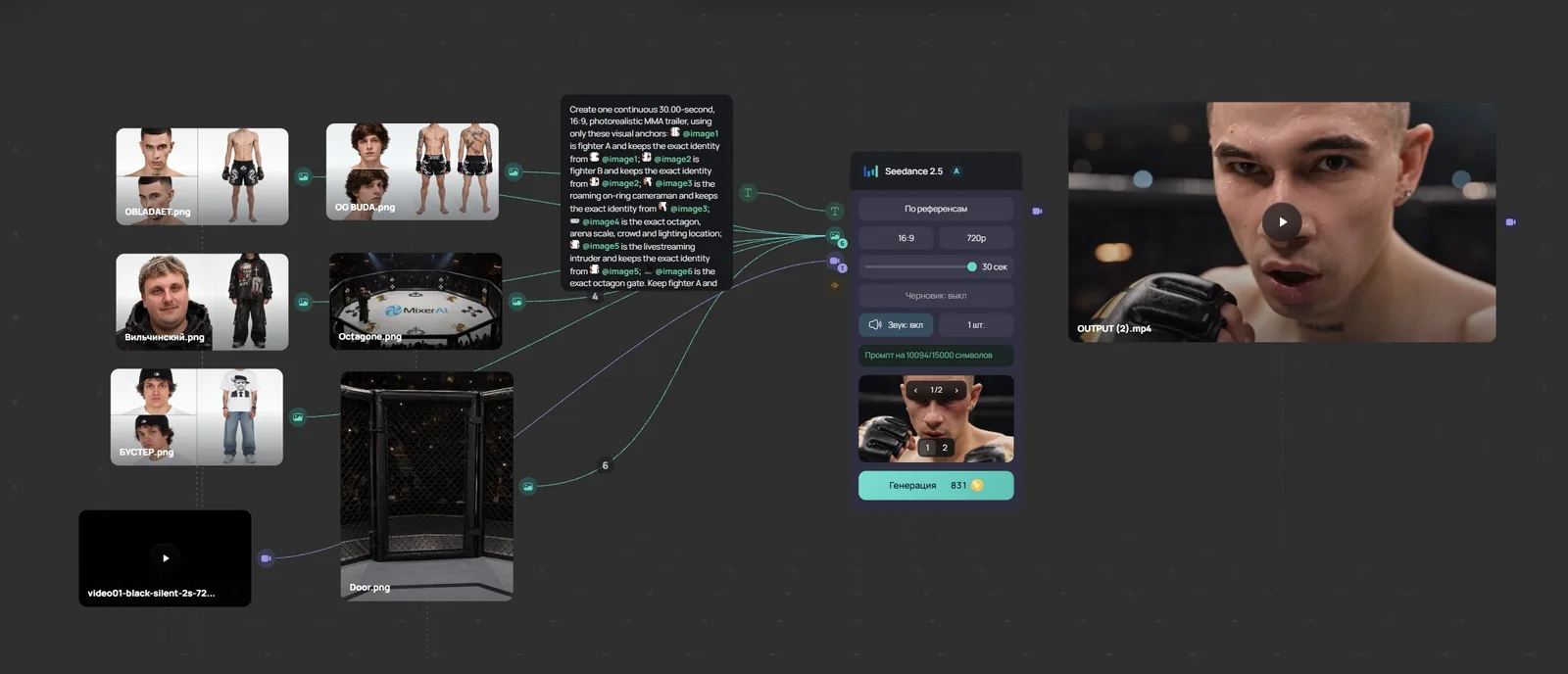
ComfyUI is an open-source app: you build a graph of nodes, but you run it on your own computer with a suitable GPU and install Python, models and nodes. The official Comfy Cloud costs from $20 a month. If you need results rather than your own setup, Mixer AI has the Canvas node board: it runs in the browser and you pay per generation.
Updated
Canvas in action
Video lesson (in Russian): a node workflow in 8 minutes
What ComfyUI needs on your own computer
- Windows, Linux or macOS on Apple Silicon (M1–M4).
- An NVIDIA GPU from the 20 series up, an AMD GPU with ROCm, or Apple Silicon; it can run without a GPU, but slowly.
- Python (3.13 recommended) and PyTorch; models and custom nodes are downloaded separately.
- There is a Comfy Desktop app for Windows, macOS on Apple Silicon and Linux.
Comfy Cloud plans
Comfy Cloud is the official hosted ComfyUI on RTX 6000 Pro GPUs with 96 GB of memory. New users get 5 trial runs.
| Plan | Monthly | Billed yearly | Run length |
|---|---|---|---|
| Standard | $20 | $16 per month | up to 30 minutes |
| Creator | $35 | $28 per month | up to 30 minutes |
| Pro | $100 | $80 per month | up to 1 hour |
ComfyUI vs Mixer AI Canvas
| ComfyUI | Mixer AI Canvas | |
|---|---|---|
| Where it runs | Your computer or Comfy Cloud | Browser |
| Setup | Python, PyTorch, models, nodes | None |
| Models | Open models and any of your own | Catalog models: Kling, Seedance, Veo, Wan, Nano Banana, GPT Image and others |
| Billing | Your hardware or cloud from $20 a month | Pay-as-you-go balance from 200 RUB, no subscription |
| Your own LoRA and custom nodes | Yes | No |
What Mixer AI Canvas has
- A node graph in the browser: one node's result becomes another node's input.
- Ready models without downloading weights: Kling, Seedance, Veo, Wan, MiniMax, Nano Banana, Seedream, GPT Image, Z-Image.
- GPT, Gemini, Claude and Grok text nodes for prompts and scripts.
- Photo crop and grid, and Scene Cutter for storyboards of up to 9 frames.
- Paid from a balance; each node's price is shown before the run.
Price sources (checked 26.10.2026)
An image-to-video graph with nothing to install
Models familiar to ComfyUI users





FAQ
Can I run ComfyUI online without a GPU?
Yes, in the cloud: the official Comfy Cloud costs from $20 a month. If you do not need your own setup, the Canvas node board in Mixer AI runs in the browser with pay-as-you-go billing.
Which GPU does ComfyUI need?
According to the ComfyUI docs: NVIDIA 20 series and newer, AMD with ROCm, or Apple Silicon. Memory needs depend on the model and are not listed in the docs.
Can I load my own LoRA or custom nodes in Canvas?
No. Canvas works with Mixer AI catalog models. If you need your own weights and nodes, ComfyUI fits better.
How much does Comfy Cloud cost?
According to the pricing page as of 26.10.2026: Standard $20, Creator $35, Pro $100 a month; billed yearly — $16, $28 and $80 a month.
Does Mixer AI need a subscription?
No. You top up the balance and pay for each generation at the model's price.
Other comparisons
- Canvas: a node board for AI models, pay as you go
- Higgsfield alternative: node canvas, no subscription
- Krea AI alternative: Krea Nodes vs Mixer AI Canvas
- Figma Weave (Weavy) alternative with no subscription
- Runway alternative: Seedance, Kling, Veo, no subscription
- Leonardo AI alternative: pay per generation, no subscription
- Freepik is now Magnific: Spaces alternative, no subscription
- FLORA AI alternative: a node canvas with pay-as-you-go
- Node-based AI: 11 canvases for images and video