 Mixer AI



Canvas: a node board for AI models, pay as you go
Canvas is a board of nodes in Mixer AI. Each node does one step: it generates an image, a video, text or audio, and its result becomes the input of the next node. It runs in the browser and is paid from one balance, with no subscription and no GPU of your own.
Updated
Canvas in action
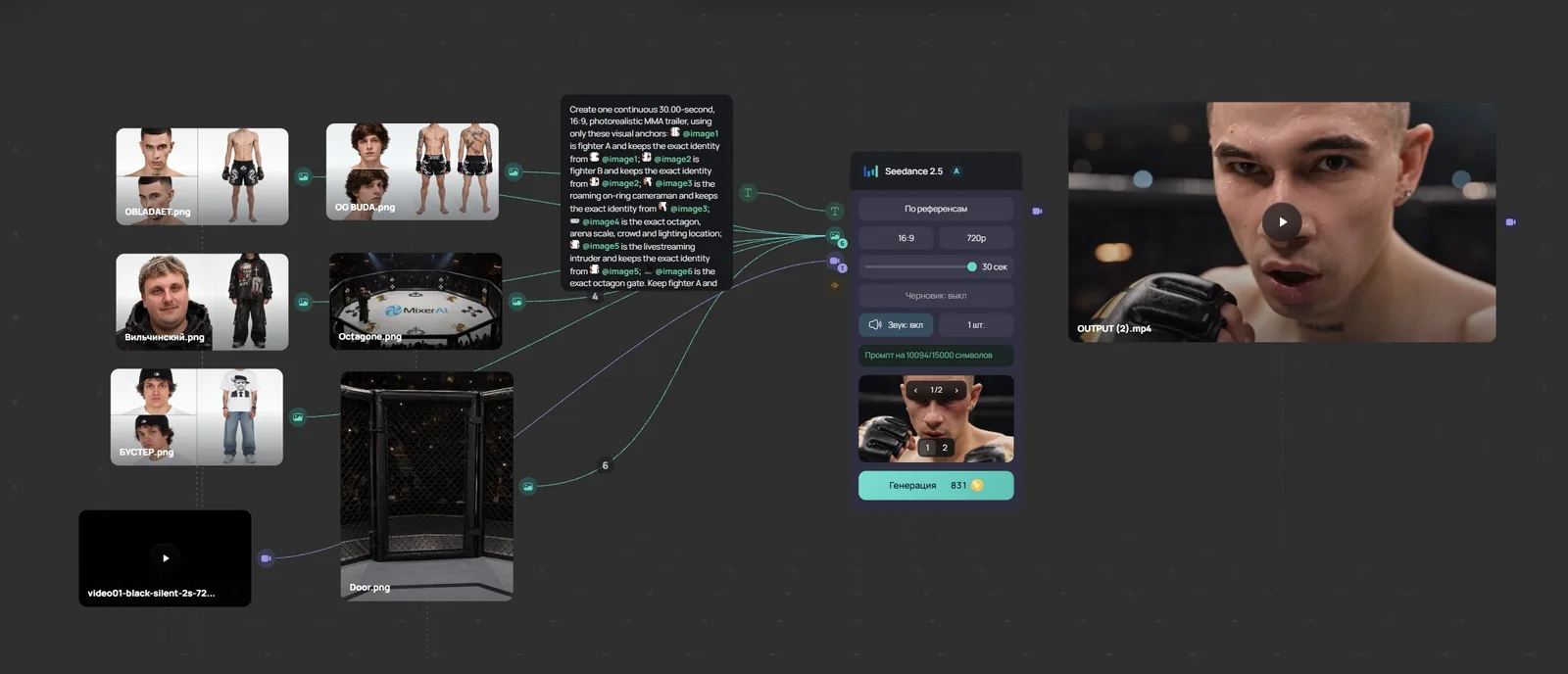
Video lesson (in Russian): a node workflow in 8 minutes
What Canvas does
- Image and video generation nodes on Mixer AI catalog models: Nano Banana Pro, GPT Image, Seedream, Midjourney, Kling, Seedance, Veo and others. Each node has its own parameters.
- Text nodes on language models, including the GPT, Gemini, Claude and Grok families. Text model selection is available only in Canvas.
- Audio: music and voice-over nodes and audio trimming right on the board.
- Connections between nodes: one node's result feeds another node's input. The editor does not create an incompatible connection.
- Photo crop and grid, and Scene Cutter: cells from several photos with a 3×3 grid are packed in order into storyboards of up to 9 frames, 16:9 or 9:16.
- Atlas: characters, locations and props from media nodes are saved to the account library and available in every project.
- Projects save automatically; a project can be shared by link for viewing.
Canvas and other node canvases
Competitor prices come from their official pricing pages as of 26.10.2026, excluding taxes.
| Service | Where it runs | How you pay | Entry price |
|---|---|---|---|
| Mixer AI Canvas | Browser | Balance in RUB (card, SBP/QR), USD and crypto; no subscription | Top-up from 200 RUB |
| Higgsfield Canvas | Browser | USD subscription, credits | $9 per month; one-time access $3 |
| Figma Weave (Weavy) | Browser | USD subscription, credits | $0 plan: 150 credits a month; paid from $24 |
| Krea Nodes | Browser | USD subscription, compute units | $0 plan: 100 units a day; paid from $9 |
| Flora | Browser | USD subscription per seat | $0 plan: up to 17 generations; paid from $18 |
| Magnific Spaces (formerly Freepik) | Browser | EUR subscription | From €15 per month |
| ComfyUI | Your own computer with a GPU | Open-source app; models and hardware are yours | Comfy Cloud from $20 per month |
Pricing
- Each generation is charged to one coin balance; there is no subscription. A node's price is shown before you run it.
- A text node first reserves an estimate, then charges by actual token usage.
- A chain costs the sum of its nodes: see each model's rate on its page or in the pricing section.
- RUB checkout: bank card and SBP/QR, top-ups from 200 RUB. Separate USD and crypto methods are also configured.
Price sources (checked 26.10.2026)
All prices and billing units →
Your first chain: image to video
Models to start with





FAQ
How is Canvas different from Studio?
In Studio you run one generation in a separate form. In Canvas several steps sit on one board and are connected: one step's result becomes the next step's input, and the whole project is saved.
Does Canvas need a subscription?
No. Canvas runs on the shared Mixer AI coin balance: you pay only for the generations you run.
How is Canvas different from Figma Weave, Krea Nodes and Higgsfield Canvas?
The idea is the same: models are connected as nodes on one board. The difference is billing: Canvas is paid from a balance with no subscription, while Figma Weave, Krea and Higgsfield sell USD subscriptions.
Do I need a GPU like for ComfyUI?
No. Canvas runs in the browser; generations run on the model side and there is nothing to install.
Which models are available in Canvas?
Mixer AI catalog models for images and video, and language models for text, including the GPT, Gemini, Claude and Grok families. Each model's capabilities and prices are described in the knowledge base.
How much does a chain of several nodes cost?
The sum of the node prices: each node is billed at its model's rate. Every node's price is shown before you run it.
Other comparisons
- Higgsfield alternative: node canvas, no subscription
- Krea AI alternative: Krea Nodes vs Mixer AI Canvas
- Figma Weave (Weavy) alternative with no subscription
- ComfyUI online without installing or a GPU
- Runway alternative: Seedance, Kling, Veo, no subscription
- Leonardo AI alternative: pay per generation, no subscription
- Freepik is now Magnific: Spaces alternative, no subscription
- FLORA AI alternative: a node canvas with pay-as-you-go
- Node-based AI: 11 canvases for images and video