 Mixer AI



Studio, Canvas, Telegram bot and MCP: what's the difference
Mixer AI runs the same models in four ways. Studio on the website runs one generation from a form. Canvas is a node board where results connect into a chain. The @addbeer_bot Telegram bot generates right in the chat. MCP connects an AI assistant: ChatGPT, Claude Code or Cursor picks the model and writes the prompt, and Mixer AI runs the generation after you approve the price.
Updated
Canvas in action
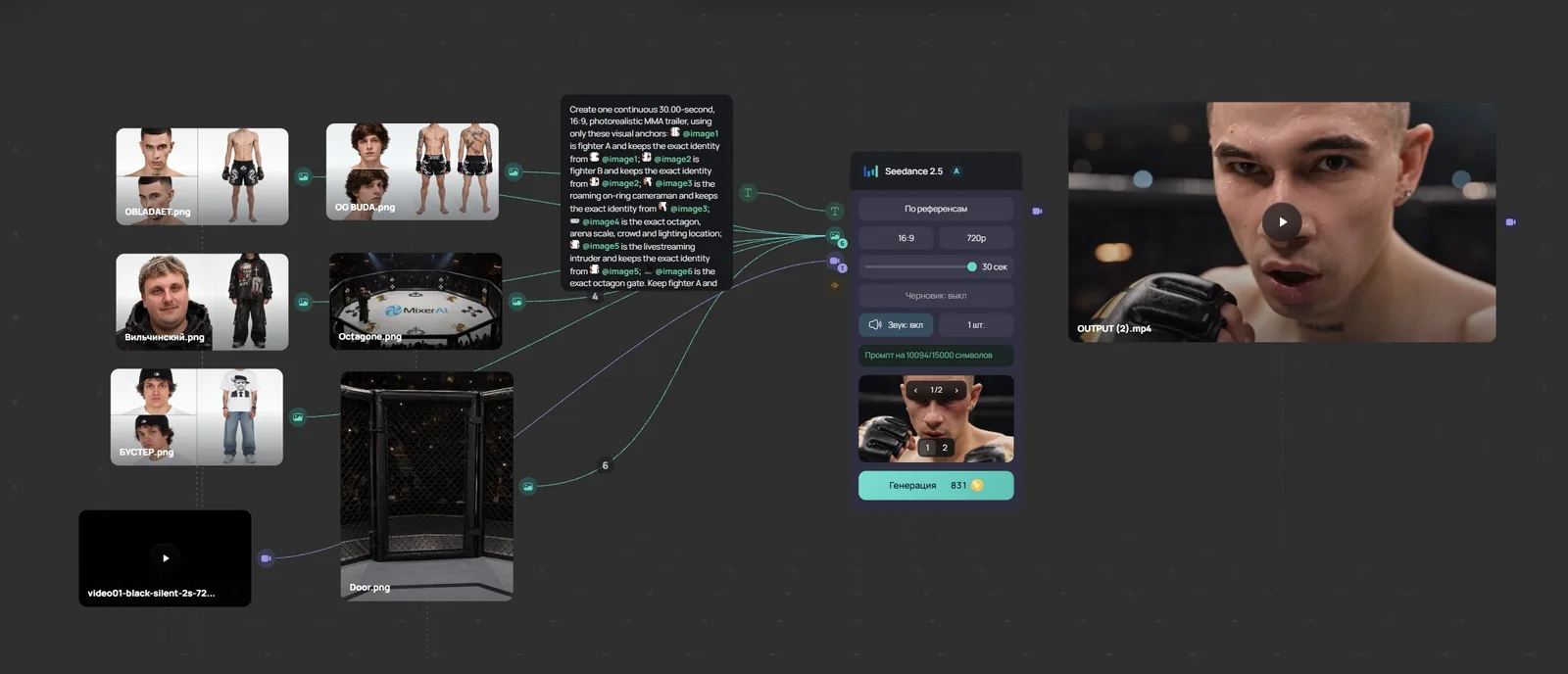
Video lesson (in Russian): a node workflow in 8 minutes
The short version
| Way | Where it runs | How you start | When it fits |
|---|---|---|---|
| Studio | Website, desktop and phone | Model, prompt, Create button | You need one image or clip |
| Canvas | Website, easier on desktop | Nodes linked output to input | Frame series, storyboard, image to video |
| Telegram bot | Telegram | Photo or Video menu, prompt as a message | Quick generation from a phone |
| MCP | ChatGPT, Claude Code, Cursor, Codex, VS Code | Ask the assistant, approve the price | A multi-scene script from the assistant |
What all four share
- Models and prices come from one Mixer AI catalog.
- You pay per generation from a coin balance, with no subscription.
- The price is shown before the run: on the button in Studio and Canvas, before the start in the bot, in the approval request in MCP.
- Results are saved in your account history.
- The set of models and features in the bot and on the website can differ.
Studio: one generation from a form
- Pick a model, write a prompt and add references if the model accepts them.
- Aspect ratio, duration and other model settings sit in the same form.
- Works in a browser on desktop and on a phone.
Canvas: a node board
- Image, video, audio and text nodes. One node's output connects to another node's input.
- Text models, including the GPT, Gemini, Claude and Grok families, are picked in Canvas only.
- Images can be cropped and split into a grid, and Scene Cutter splits a 3×3 storyboard into separate frames.
- The project stays on the board and can be opened by a view-only link.
The @addbeer_bot Telegram bot
- The menu has Photo, Video, Balance, History and Language.
- Telegram lets a bot download input files up to 20 MB. Upload larger files on the website.
- If you sign in to the website with Telegram, it is the same account and the same balance.
MCP: generation from an AI assistant
MCP (Model Context Protocol) is an open standard that lets an AI assistant connect external tools. The Mixer AI server address is https://mcp.mixerai.org/mcp.
- The assistant reads the catalog, picks a model, writes the prompt and gets the price. Mixer AI runs the generation.
- You sign in with your Mixer AI account over OAuth. No keys or tokens to paste.
- Every paid run waits for you to approve the exact price: with a button in the chat or on the Mixer AI approval page.
- One request can send up to 10 scenes, and you can check their status afterwards.
- Reading the catalog, statuses and history costs nothing.
Which one to pick
- One image or clip: Studio or the bot.
- A frame series with one character, a storyboard, an image-to-video chain: Canvas.
- Generating from a phone without a browser: the bot.
- A multi-scene script written by an AI assistant: MCP.
How to start
Popular models





FAQ
How is Studio different from Canvas?
Studio runs one generation from a form. In Canvas nodes are linked: one model's result becomes another model's input, and the whole chain stays on the project board.
Do I need a subscription?
No. Each generation is charged to your coin balance, and the price is shown before the run. The same applies to Studio, Canvas, the bot and MCP.
What is MCP in Mixer AI?
It is the server https://mcp.mixerai.org/mcp, which ChatGPT, Claude Code, Cursor, Codex, VS Code and other MCP clients connect to. The assistant prepares the request, Mixer AI runs the generation and charges your balance.
Can an AI assistant spend money without me?
No. Every paid run through MCP waits for you to approve the exact price. Without approval the generation does not start.
Is the balance shared between the bot and the website?
Yes, if you sign in to the website with Telegram: it is the same account and the same balance.
Does Mixer AI have an API?
External access goes through the MCP server. You sign in with your Mixer AI account over OAuth; no keys are handed out manually.