 Mixer AI




How to make pictures and footage from a neural network look real
AI images give themselves away with glossy skin, light that comes from nowhere and a frame that is too clean. Realism comes from three things: the way the shot was taken in the first line of the prompt, real skin with small flaws, and light from a source that exists in the scene.
More
For photos of people use GPT Image 2 or Nano Banana 2; for video use Seedance 2.5 or Wan 3.0.
Documentary footage, smooth handheld camera. A young woman with long blond hair, in a long olive coat, light trousers and olive shoes, crosses a city street between old stone buildings at a pedestrian crossing. A large suede bag hangs from her shoulder. First she walks sideways to the camera, then turns away and walks off, the wind lifting her hair. The camera pans smoothly and follows her. Overcast daylight, a few cars far down the road. No music, no sudden camera moves, do not beautify the face.
Step by step
Open the prompt with how it was shot: "amateur handheld photo", "documentary footage, handheld camera", "security camera in the corner of the room", "35 mm film photo".
This line sets the light, sharpness and composition of the whole frame.
Describe the skin and the small things: visible pores, freckles, slight redness, fine lines, flyaway hair, an uneven hairline.
End with a line of exclusions: no plastic skin, no blown highlights, no oversaturated colors, do not beautify the face.
Name a light source that is in the frame: a window on the left, a street lamp above, low evening sun.
A character outdoors gets natural light and skin more easily than in a studio.
For a photo, open Image in the studio and pick GPT Image 2 or Nano Banana 2.
Keep the face large: a small face in a wide shot loses detail. To keep a real person's look, attach their photo and write "image 1 sets the face; do not change or beautify the face".
For video, pick Seedance 2.5 or Wan 3.0, keep one or two actions and a calm camera.
In Seedance 2.5 turn on Draft first: a 480p clip costs less and already shows whether the scene feels alive; finalize a good draft to 1080p.
Compare the start, middle and end of the clip: the skin has not turned waxy, the hands are intact, the light stays the same.
If the face changed, reduce the motion and frame the shot tighter.
Ready prompts for realistic photos and video
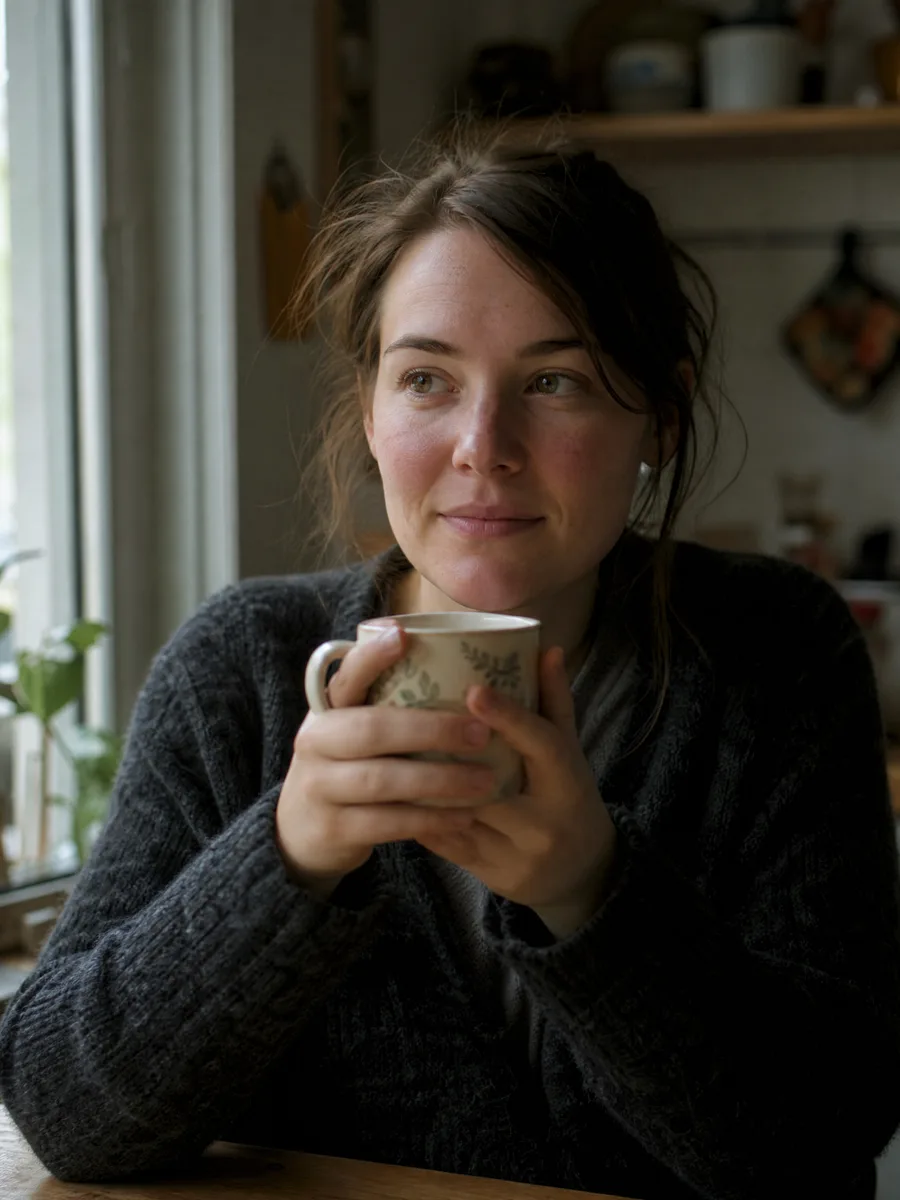
Amateur handheld photo, 35 mm lens, shallow depth of field. A woman around thirty sits by the kitchen window, holding a mug with both hands and looking just past the camera. Soft daylight from a window on the left, the right half of her face in light shadow. Visible pores, freckles on the nose, slightly flushed cheeks, a few loose strands of hair. Slightly off-center framing, natural grain. No plastic skin, no blown highlights, no oversaturated colors, do not beautify the face.
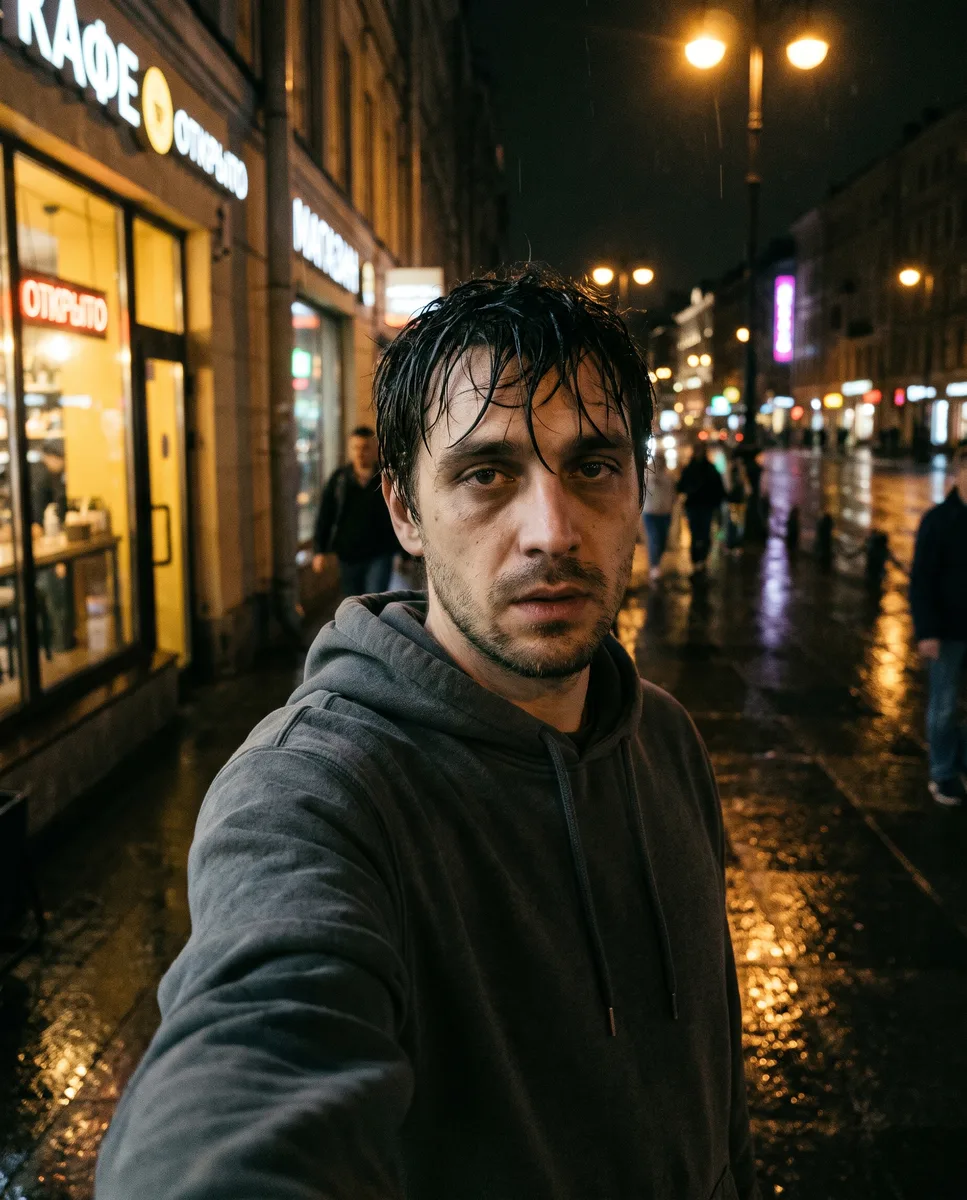
Photo taken at arm's length, slightly from below and to the side. A man around twenty-five in a grey hoodie stands on a street after rain, blurred shop windows behind him. Light from a street lamp above and a shop window to the side, warm and uneven. Stubble, shadows under the eyes, wet hair stuck to the forehead. Slight softness and noise, as in low light. No phone in the frame. No gloss, no perfect facial symmetry.
Price in coins
Why AI photos look AI-generated
The main signs are smooth glossy skin, a perfectly symmetrical face, light with no visible source and the same sharpness across the whole frame. A real camera does not shoot like that: it has noise, soft edges, a blown-out window and shadow where the light does not reach.
Words like "realistic", "4K" or "ultra-detailed" add no realism. Visible details do: where the light comes from, what the skin looks like, how the shot was taken, what ended up in the frame by accident.
How to make an AI photo look real
Build the prompt from six parts in this order: how it was shot, subject and place, light, skin and clothing, imperfections, exclusions.
| What to describe | How to write it | What to avoid |
|---|---|---|
| Shooting style | "amateur handheld photo", "35 mm film", "harsh direct flash" | vague words like "professional photo" |
| Lens | "85 mm portrait, blurred background", "35 mm street photo" | mixing several styles in one frame |
| Skin | pores, freckles, moles, fine lines, slight redness | "perfect skin", "smooth face" |
| Light | source and side: "window on the left", "street lamp above" | studio light with no reason |
| Imperfections | slight softness, grain, slightly off-center framing | perfect symmetry and gloss |
| Exclusions | "no plastic skin, no blown highlights, do not beautify the face" | a prompt with no limits |
You can also make an existing photo more realistic: upload it to GPT Image 2 or Nano Banana 2, describe one change, such as natural skin texture and window light, and ask to keep everything else the same.
The "shot on a phone" look
A phone shot is recognized by its details: a wide angle, an arm's-length or low angle, a tilted horizon, mixed light, noise in the shadows. Describe exactly those.
The model may read "shot on a phone" literally and put a phone in the frame. Describe the angle and image quality without naming the device; if a phone still appears, add "no phone in the frame".
The same works for video: "handheld camera, slight shake, the camera lags a little behind the subject". A real camera has weight and does not float freely, so a smooth orbit around a face gives the generation away.
Realistic AI video: motion, light and sound
Less motion means fewer errors: one or two characters, one or two actions, a calm or static camera. Make fights, jumps and fast orbits a separate generation.
If the video starts from a photo, prepare the photo in the scene's light: a person from a studio shot looks pasted into someone else's frame. Grain and noise in the start frame carry into the video, so keep the frame clean and ask for film grain in the video prompt.
Describe weight and physics: what falls on what, how fabric and hair move in the wind. Name sounds precisely: steps on gravel, a humming fridge. Real-life footage almost always needs the line "no music".
Higher resolution is not always more real: on Seedance 2.0, 1080p often looks more natural than 4K.
Which models to use for realistic photos and video
Choose the model by task, then add realism with the prompt and references.
| Task | Model | What to specify |
|---|---|---|
| Photo of a person who looks like a real one | GPT Image 2 | their photo as a reference, "do not change or beautify the face", natural light |
| Realistic photo from text, a series in one style | Nano Banana 2 | a shooting-style template, then subject, place and framing |
| Realistic video with people and facial acting | Seedance 2.5 | shooting style, skin, timed action, sound, exclusions; start with Draft |
| Selfie clip with a spoken line | Wan 3.0 | character photo, the line as text or an audio file, numbers in speech as words |
| Character sheet for a series of clips | GPT Image 2 | three views: front face, profile, full body; white background, even light |
Nano Banana Pro, MiniMax H3 and Gemini Omni suit skin close-ups less: their skin more often comes out smooth or glossy. Gemini Omni is strongest at editing an existing video.
Which model to use




FAQ
How do I make an AI photo look realistic?
Describe how it was shot, the light source and skin with small flaws, then list what must not appear: plastic skin, blown highlights, a beautified face. The words "realistic" and "4K" do not help on their own.
Which AI makes the most realistic photos of people?
In Mixer AI, use GPT Image 2 or Nano Banana 2 for photos of people. GPT Image 2 holds a face from a reference better; Nano Banana 2 is handy for series from one template.
Which AI makes realistic video?
Seedance 2.5 for people and facial acting, Wan 3.0 for selfie clips with a spoken line. Both accept a character photo as a reference, which adds a lot of realism.
Why does skin look plastic in AI photos?
Usually because of studio light and no skin detail in the prompt. Add pores and small flaws, light from a source in the scene and the exclusion "no plastic skin".
Can I make an existing photo more realistic?
Yes: upload it to GPT Image 2 or Nano Banana 2, describe one change such as natural skin texture, and ask to keep the rest as it is. Then check that the face has not changed.