 Mixer AI




Making a short movie from several generations on the canvas
One video generation lasts 30 seconds at most, so a film is built from parts. Split the script into scenes, prepare reference sheets for characters and places, lay out the storyboard on the Mixer AI canvas, then generate every part with the same references and join it to the next by the last frame or by the previous clip.
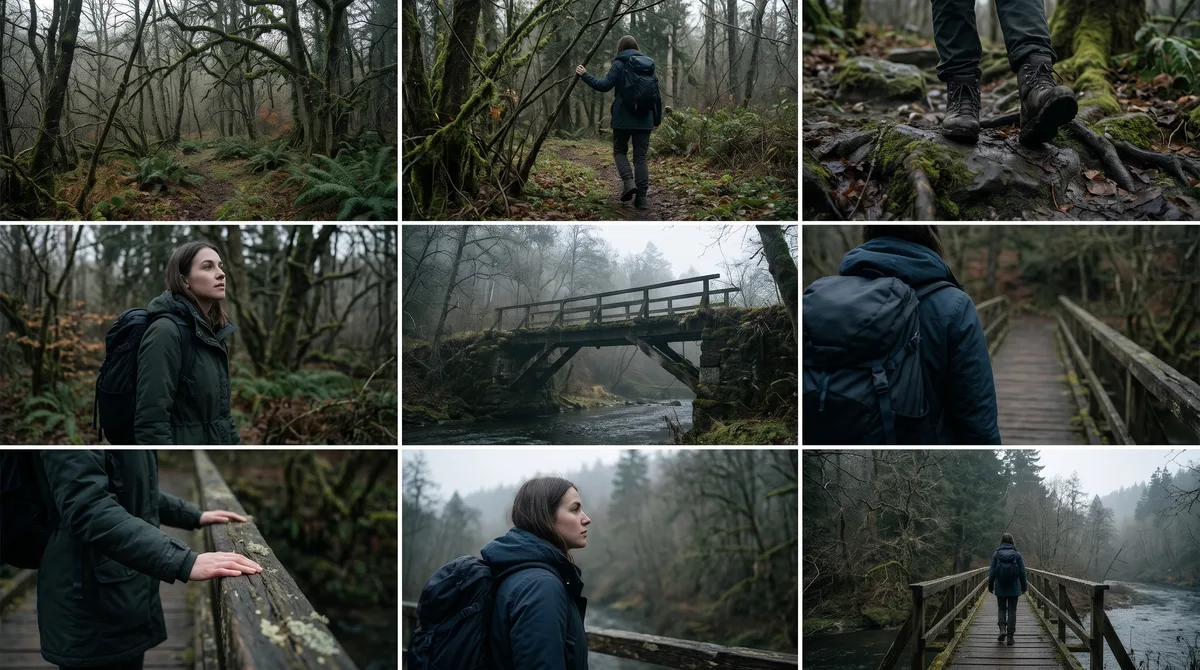
Storyboard of one scene: 9 frames in a 3×3 grid on one image, even 16:9 cells with thin white gaps. A girl with a backpack walks out of a forest towards an old bridge. Frames in order: wide shot of the forest; the girl steps onto the path; close-up of her boots on stones; she notices the bridge; wide shot of the bridge; she walks to the edge; close-up of her hands on the railing; she looks at the far bank; wide shot as she steps onto the bridge. The same girl, clothes and overcast light in every frame, no text.
Step by step
Split the script into scenes and the scenes into parts that each fit one generation and end on a settled state: the character holds still, the action is finished.
A text node on the canvas helps write out scenes and lines.
Use an image node to make character and location sheets: each character in three or four views on a white background, each place with no people in frame.
Add them to the Atlas to reuse them in any project.
Connect the frame and the sheets to a video node and run the first part.
For the next one, stop the finished video on its last frame and click Screenshot on the node: the frame appears on the canvas as its own node, ready to use as the first frame.
Watch all parts in sequence: seams, eyelines, clothing and props.
Redo only the failed part, with the same references.
Prompts for parts of a film
Replace the file numbers with your own. The last prompt is for an image model and gives you a storyboard of the scene.
Image 1 is the man, image 2 is the woman, image 3 is the kitchen. Evening, light from a lamp above the table. 0–4 s: wide side shot, the man and the woman stand on opposite sides of the table, her arms crossed. 4–7 s: close-up of the man, he looks towards the woman and says quietly: “I didn't make it.” 7–10 s: close-up of the woman from the other side of the table, she turns to the window and says nothing. They look at each other across the table, neither crosses it. Sound: fridge hum, a ticking clock, the man's line. No music, no other people.
Video 1 is the previous part; continue from its final moment. Image 1 is the girl's character sheet, image 2 is a forest road. At the end of video 1 the girl stands on the road looking ahead, a backpack on her right shoulder. Then: 0–3 s: medium shot from behind, she adjusts the backpack strap and takes the first step. 3–8 s: the camera moves alongside her as she walks along the road from left to right. Same overcast light and the same clothes as in video 1. Sound: footsteps on gravel, wind in the trees. No music.
Image 1 is the character sheet of an old man in a blue jacket. Image 2 is a pier at dawn. Low-angle close-up: the man stands at the edge of the pier looking at the water, the wind moves his jacket collar. The camera slowly rises to his eye level. Cold dawn light from the left, light mist over the water. Face, jacket and pier match image 1 and image 2. No other people.
Price in coins
How to make a film with AI: the workflow
| Stage | On the canvas | Result |
|---|---|---|
| Script by scenes | Text node | A list of parts with actions and lines |
| Character and location sheets | Image node, Atlas | The same faces, clothes and place in every part |
| Storyboard | 3×3 grid, Scene Cutter, Crop | The first frame of every part |
| Generating parts | Video nodes connected to frames and sheets | Clips of up to 30 seconds |
| Seams | Screenshot of the last frame, or the previous clip as a video reference | Action that flows from part to part |
Each node shows its price before you run it; the whole film costs what its nodes cost.
Making an AI film from a script: splitting it into parts
A part should fit one generation and end on a stable state: the character freezes in a pose, a door closes, a car stops. That is where a seam stays clean.
Decide the scene boundaries first, then pick the model by the length of each part. The models below make up to 30 seconds per generation; most other models in the catalog give 15 seconds or less.
| Model | Length of one generation | What it adds to a film |
|---|---|---|
| Seedance 2.5 | 4–30 seconds | Timecoded shots, up to 30 image and 10 video references, seams from the previous clip |
| Wan 3.0 | 2–30 seconds | Timecoded shots, first and last frame, image, video and audio references |
| Kling 4.0 | 3–30 seconds | Image and video references, keyframes (up to 10) |
| Grok Imagine 1.5 | 6–30 seconds | Low-cost scene drafts from text or from images (up to 7) |
The exact modes and limits are shown in the settings of the selected model's video node.
Character and location sheets
Generations do not remember each other: attach the same sheets to every part and restate where the character is and what they hold.
One sheet per character. The same person at a different age gets a separate sheet with the age in the prompt. For a place, write “no people in frame”. Leave small accessories off a sheet unless the scene needs them.
A sheet is usually lit flat, like a studio. In the scene prompt, set the scene's own light: a window, a street lamp, a sunset. Characters, places and props saved to the Atlas are available in every project on the account.
AI storyboard on the canvas
An image model draws 9 frames of the scene in a 3×3 grid on one picture. Scene Cutter gathers the selected cells from one or several such pictures into a storyboard of up to 9 frames in 16:9 or 9:16; the order you pick them becomes the frame order.
Approve the first frame of each part as an image: it costs less than a clip and shows composition, light and the character's face at once. A weak first frame gives a weak video.
To keep the world consistent from frame to frame, feed the previous approved frame as a reference for the next one. A rough sketch with stick figures and an arrow for camera direction also works for blocking.
Joining parts: by last frame and by video reference
Seam by frame: stop the finished video on its last frame and click Screenshot on the node. The frame becomes a new node on the canvas; use it as the first frame of the next part.
Seam by video reference: attach the previous part as a video reference, describe how it ended in the first line, then the new action. Seedance 2.0 and 2.5, Wan 3.0, MiniMax H3 and Kling 4.0 can do this; a Wan 3.0 video reference is limited to 15 seconds.
Across a seam, keep the eyeline, the way the character faces and the screen direction. Use one lighting reference frame for the whole scene.
To add seconds to an uploaded clip, use Gemini Omni 1.2: it adds 3–10 seconds to a video of up to 15 seconds. Finished results from Veo 3.1, Grok Imagine and Midjourney Video have an Extend button when the result offers it.
Several angles of one scene
If the scene happens in one place with the same people and fits the generation length, write the angles in one prompt as timecoded segments: a wide shot, a close-up of one character, a reverse close-up of the other. Seedance 2.0 and 2.5, Wan 3.0 and MiniMax H3 handle this well. Kling 3.0 changes shots with Multi-shot scenes: up to 5 scenes, up to 15 seconds in total.
Shot length depends on framing and action, so there is no need to cut a scene into equal pieces. An object or place described only in text stays the same only inside one generation.
Use separate generations when each angle needs its own retake, the scene changes, or the whole scene runs longer than the model allows. Attach the same character and location sheets to each and state which side the camera is on so characters do not swap places.
Which model to use





FAQ
Which AI is best for making films?
For parts of up to 30 seconds use Seedance 2.5, Wan 3.0, Kling 4.0 or Grok Imagine 1.5; an image model such as Nano Banana Pro makes character sheets and the storyboard. On the Mixer AI canvas all steps sit on one board and are connected.
Can one generation make a film longer than 30 seconds?
No, one generation lasts 30 seconds at most. A longer film is built from parts joined by the last frame or by the previous clip.
How do I keep the same character in every scene?
Attach the same character sheet to every generation and name its role in the prompt. The Atlas is a convenient place to keep it.
How do I shoot one scene from several angles?
Write the angles as timecoded segments in one prompt, or make separate generations with the same references. The second way gives more control over each shot.
Where do I edit the finished parts into a film?
The finished parts can be joined in any video editor, in storyboard order.